MuleSoft Managed Services Pricing: What Actually Drives the Cost in 2026

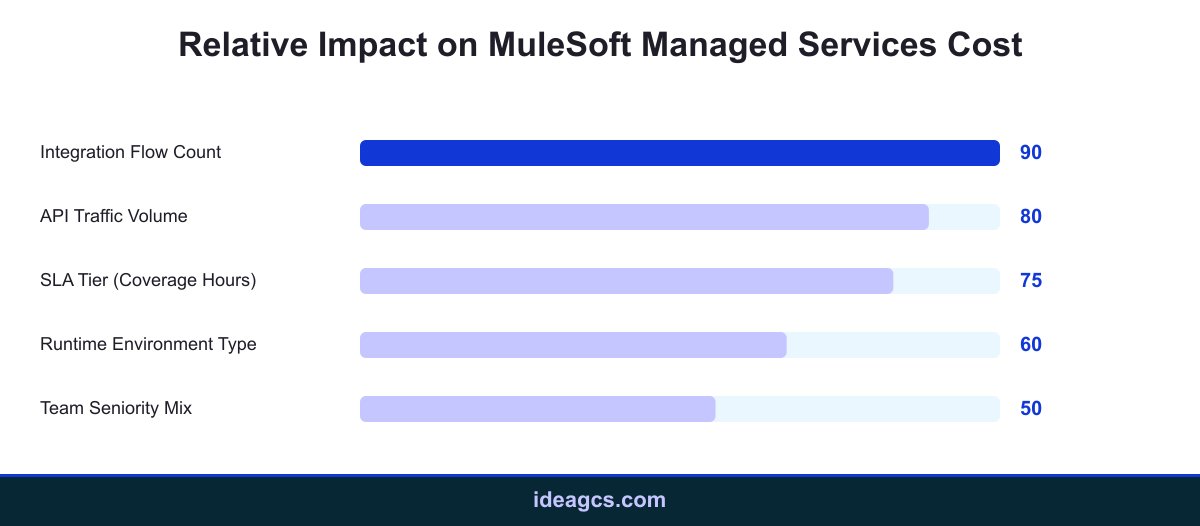
Most guides on mulesoft managed services compare it against building an in house team, but almost none explain what the invoice actually reflects. Pricing for a mulesoft managed services engagement is not a flat monthly fee picked from a brochure. It moves with the number of integration flows you run, the SLA tier you commit to, the runtime environment you deploy on, the traffic volume flowing through those integrations, and the seniority mix of the team supporting it. Understanding those levers before you request a proposal makes it far easier to compare quotes, spot inflated pricing, and avoid paying for coverage you do not actually need.
Key Takeaways
- Integration flow count and API traffic volume are the two biggest drivers of a mulesoft managed services quote, more than the vendor's brand name.
- 24/7 SLA coverage typically costs meaningfully more than business hours support, so match the tier to actual business risk rather than defaulting to the highest option.
- CloudHub, on premises, and hybrid runtimes carry different operational overhead, which shows up directly in mulesoft support services pricing.
What MuleSoft Managed Services Actually Includes
Before comparing prices, it helps to define the scope. A typical mulesoft managed services contract covers monitoring of deployed APIs and integration flows, incident response when a flow fails, patching and upgrades of the Mule runtime, capacity planning as traffic grows, and ongoing minor enhancements to existing integrations. It usually does not include net new integration builds, which are typically scoped and billed separately as project work through mulesoft development services. Some contracts also bundle in periodic health checks, quarterly architecture reviews, and version upgrade planning as the platform evolves, though the depth of that extra coverage varies significantly between providers and is worth confirming line by line rather than assuming it is included.
Because the scope spans monitoring, incident response, and maintenance rather than a single deliverable, providers price mulesoft managed services more like an insurance policy than a project. The premium reflects how much could go wrong and how fast someone needs to respond, which is exactly why the cost drivers below matter more than any single vendor's rate card. Two providers quoting wildly different numbers for what looks like the same scope on paper are usually assuming different flow counts, traffic levels, or response time commitments underneath.
The Real Cost Drivers Behind a Managed Services Quote
Five factors consistently move the number on a mulesoft managed services proposal. The first is integration flow count and complexity, since a provider supporting five simple flows takes on far less operational risk than one supporting fifty flows touching ERP, CRM, and finance systems simultaneously. The second is API traffic volume, because higher throughput increases the chance of rate limit issues, latency incidents, and scaling work.
The third driver is environment count. Supporting dev, test, and production separately, each with its own monitoring and change control, costs more than supporting a single environment. The fourth is the seniority mix of the support team, since a rotation staffed mostly with senior integration architects costs more per hour than one leaning on mid level engineers backed by senior escalation. The fifth is the runtime and SLA tier, covered in the next two sections. None of these operate in isolation. A small deployment on CloudHub with business hours support and two environments sits at the low end of the range, while a multi region enterprise deployment with 24/7 coverage across five or more environments sits at the high end, often several multiples higher.
Runtime Environment: CloudHub vs On Premises vs Hybrid
Where the Mule runtime is deployed changes the operational burden a provider carries, and it is one of the fastest ways to explain a wide spread between two mulesoft managed services quotes. CloudHub, MuleSoft's own iPaaS, shifts infrastructure patching and scaling to the platform itself, which generally makes it the least expensive environment to support under a managed services contract.
On premises deployments require the provider to manage infrastructure health, network access, and security patching in addition to the integration flows themselves, which adds cost. Hybrid deployments, common among enterprises still migrating legacy systems, sit in between but often carry the highest coordination overhead, since the team has to reason about two operating models at once. Businesses evaluating mulesoft consulting services for a modernization roadmap should ask directly how each runtime option changes the long term support bill, not just the upfront migration cost.
SLA Tier and Support Coverage
SLA tier is the single most visible line item on most quotes because it is the easiest to compare across providers. Business hours coverage, typically an 8 to 12 hour window on business days, costs the least since it requires the smallest standing team. Extended coverage, often 16 hours across two time zones, sits in the middle. Full 24/7 coverage with guaranteed incident response times, sometimes under 30 minutes for critical severity issues, sits at the top of the range because it requires a follow the sun rotation or on call staffing.
The right tier depends on what actually breaks if an integration fails at 2am. A B2B order flow feeding a warehouse system may genuinely need 24/7 coverage, while an internal reporting sync that only matters during business hours does not. Buying more SLA than the business risk justifies is one of the most common ways enterprises overpay for mulesoft professional services generally, not just managed support specifically.
How to Read a Managed Services Proposal
Once you understand the five cost drivers, a mulesoft managed services proposal becomes much easier to interrogate. Ask the provider to break the quote down by driver rather than presenting a single bundled number. A proposal that lists flow count, traffic tier, environment count, SLA commitment, and team composition separately is far easier to negotiate than one that hides all five behind a flat monthly fee.
It is also worth asking how the contract handles growth. Integration footprints rarely stay static, and a provider whose pricing model cannot flex as flow count or traffic volume increases will either under deliver as you scale or force a disruptive renegotiation later. A well structured mulesoft support services agreement should specify how added flows, new environments, or an SLA upgrade mid contract get priced, rather than leaving that to a future conversation.
Finally, ask what happens during a major incident that falls outside normal scope, such as a source system outage that cascades across several integrations at once. Some providers treat this as covered under the standard SLA, others bill it as an out of scope escalation. Getting that answer in writing before signing avoids an unpleasant surprise the first time something actually breaks at scale.
Where Illustrative Pricing Bands Land
Actual figures vary by provider, region, and contract length, but the pattern across the market is consistent enough to describe in bands. Small deployments, roughly under 15 flows on CloudHub with business hours support and two environments, tend to fall in the lower end of the market range for mulesoft managed services. Mid sized deployments, in the 15 to 40 flow range with extended hours coverage and three environments, typically land in the middle band, often two to three times the small deployment cost.
Enterprise multi region deployments, 40 plus flows, hybrid or on premises runtime, 24/7 SLA, and four or more environments, sit at the top of the range, frequently four to six times the small deployment band. Treat any of these figures as directional. The only reliable way to price a specific engagement is to map your own flow count, traffic volume, environment count, and required SLA against a provider's rate card, then ask them to justify each line against the drivers above.
Conclusion
MuleSoft managed services pricing is not arbitrary. It tracks five measurable factors: integration flow count, API traffic volume, environment count, team seniority mix, and the combination of runtime and SLA tier. Enterprises that map their own footprint against those drivers before requesting proposals negotiate mulesoft managed services contracts from a position of knowledge rather than guesswork. If you are budgeting for a managed services engagement or comparing quotes from multiple providers, talk to IdeaGCS about mapping your integration footprint to a realistic cost band before you sign anything.
Frequently Asked Questions
What is included in mulesoft managed services?

Why does MuleSoft managed services pricing vary so much between providers?
Is CloudHub cheaper to support than on premises MuleSoft?
Does 24/7 support cost significantly more than business hours coverage?
How many integration flows justify a managed services contract over in house support?
Does team seniority affect mulesoft managed services cost?
Should I budget separately for MuleSoft development services and managed services?
How does hybrid deployment affect managed services pricing?
What is a reasonable incident response time to expect for critical severity issues?
Where can I compare mulesoft managed services against building an in house team?
Contact Us
Share on Social Media
Contact Us